
Garmin Approach S70: The Complete Guide
Overview: What the Garmin Approach S70 brings to the course
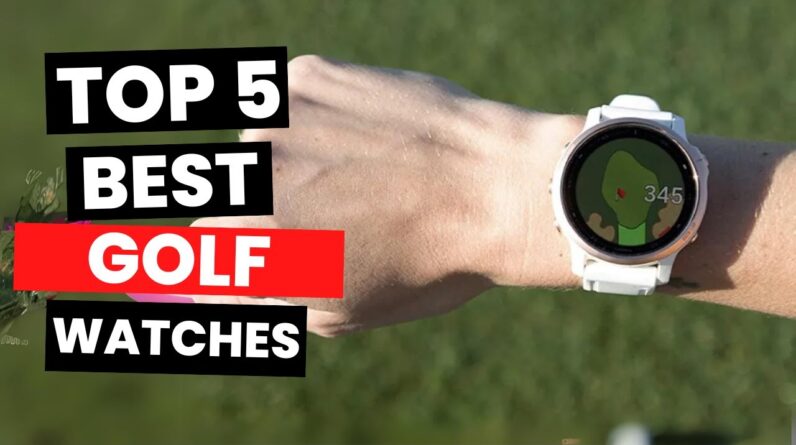
The Garmin Approach S70 is a premium golf GPS smartwatch designed to bring course insight directly to your wrist.Built for serious golfers and enthusiasts alike, it combines built-in golf course maps, precise shot distances, and smart features in a agreeable, wearable design. If you want reliable club-target facts, on-device course data, and actionable guidance without carrying a conventional rangefinder or phone, the S70 aims to deliver.
Key strengths include rich golf-specific data on a colour touchscreen, robust battery life for longer rounds, and seamless connectivity with the Garmin Connect ecosystem. Whether you’re a casual weekend player or you compete in local tournaments,the S70 is designed to help you read greens,plan your shots,and keep score with ease.
Core features at a glance
- Built-in golf course maps with front/center/back distances and on-hole yardages
- Color touchscreen display that remains readable in bright sun
- Automatic shot tracking and round analysis to review performance
- Virtual Caddie and Plays like Distance guidance to optimize club choice
- Hazard view and Green View with pin position for improved approach planning
- Preloaded courses with regular map updates and easy course downloads
- GPS, GLONASS, and Galileo compatibility for reliable navigation across courses
- Smart features: notifications, weather, and Bluetooth connectivity with Garmin Connect
Display, design, and comfort
Design and build
The S70 combines a sporty, light design with a rugged build suitable for on-course wear. It sits comfortably on the wrist, with a quick-release band option for easy swapping. The watch is designed to be readable in sunlight, and the touchscreen interface enables intuitive access to hole data, scoring, and green reading.
Display and readability
The 1.3-inch color touchscreen offers clear legibility on the fairway. On-device controls complement touch navigation, so you can switch between hole views, hazard notes, and distance readouts without fumbling with your watch. For golfers who wear sunglasses or play in bright conditions, high contrast and brightness options help maintain readability throughout the round.
Comfort and wearability
Weight and thickness are kept in check to minimize distraction during a round. The S70’s form factor suits right- or left-handed players, and the band options support long-term comfort through 18-hole rounds and multi-day wear for training sessions.
Golf-specific features: Maps, distances, and green insight
Course maps and on-hole data
Preloaded with golf courses around the world, the S70 provides on-hole data that includes front, center, and back distances, and also straight-line distances to key targets. The course view helps you see layout details without needing a separate device.
Green view and pin position
Green view allows you to adjust the pin position for each hole, enabling more accurate approach planning and club selection.This feature is especially helpful on green shapes that vary from hole to hole.
Hazards, distances, and hazard view
Hazard markers and distances help you identify trouble spots before you commit to a shot. the hazard view consolidates information you need for club selection and strategy, reducing guesswork on challenging holes.
Virtual Caddie and Plays Like Distance
Virtual Caddie provides data-driven guidance to help you choose a club and line based on your typical performance. Plays Like distance adjusts yardages to account for uphill or downhill lies, giving you more realistic targets for each shot.
AutoShot and round analysis
AutoShot tracking records your shot locations and lengths automatically, enabling after-round review that highlights your strengths and areas for advancement. This feature is valuable for players who want objective data to drive practice sessions.
GPS, maps, and navigation on the course
Satellite positioning and satellite networks
the S70 supports multiple satellite networks, including GPS, GLONASS, and Galileo, to improve position accuracy across diverse courses and environments. This multi-band capability helps maintain reliable yardages even in tree-covered or partially shaded areas.
Course updates and downloads
New and updated courses can be downloaded via Garmin Connect, ensuring you have current maps and hole layouts. Regular updates help you avoid outdated information on newer layouts or reconfigured holes.
On-wrist navigation and quick access
Navigation taps are designed for quick access during your round. You can switch between hole view, scorecard, and distance readouts without slowing play, keeping you focused on the game rather than the device.
Battery life and charging expectations
Smartwatch vs. GPS mode
Battery life depends on usage patterns,display brightness,and GPS modes. in typical GPS-heavy play, expect a solid round that won’t require an extra battery pack. In smartwatch mode, the S70 can last longer between charges, making it suitable for daily wear beyond rounds.
Real-world guidance
- For back-to-back rounds in GPS mode with map features enabled, plan for a mid-to-high usage drawdown and consider charging between rounds if you play multiple days in a row.
- If you mainly use the watch for general fitness and notifications, you’ll likely see longer smartwatch-mode endurance.
Fitness, health metrics, and smart features
Health and activity tracking
Beyond golf, the S70 offers standard fitness tracking like heart rate monitoring, sleep insights, and daily activity metrics. These features help you manage overall fitness and recovery, which can influence your golf performance over time.
Smart features and connectivity
Bluetooth connectivity enables notifications from your phone, making it convenient to stay connected on the course. Depending on your setup, you may also access weather data and other app-based insights without pulling out your phone.
Setup, pairing, and Garmin Connect workflow
Initial setup
Power on the S70, pair it with your smartphone via the Garmin Connect app, and sync your golf profiles. The app guides you through linking to compatible courses, preferences, and your target metrics.
Garmin Connect ecosystem
Garmin Connect centralizes your round data, practice results, and long-term progress. You can review shot distances, round scores, greens-in-regulation, and other metrics in a clean dashboard. The platform also supports sharing of data with coaches or training partners if you want feedback on your game.
Practical tips for getting the most from the S70
- Customize your home screen with the most-used features (hole view, scorecard, distance to target) for faster access during play.
- Calibrate the pin position before taking aim on a hole to improve green-reading accuracy.
- Enable Plays Like Distance and Virtual Caddie for more accurate club recommendations when conditions change (uphill/downhill, wind impact, etc.).
- Keep course maps updated via Garmin Connect to ensure you have the latest layouts and hole data.
- Use AutoShot to build a data-driven practice plan by reviewing your longest drives, approach accuracy, and short game performance after rounds.
Case studies and first-hand experiences
Case Study 1: Weekend golfer improving approach consistency
John, a 38-year-old amateur, relied on range practice and manual yardage estimates. After switching to the Garmin Approach S70,he integrated Virtual Caddie guidance and Plays Like Distance for decision-making. Over six weeks, his approach accuracy improved, and he reported fewer misjudgments on uphill greens. The AutoShot data helped him identify a tendency to overshoot long irons, leading to targeted practice on those gaps.
Case Study 2: Club tournament player balancing map data with quick clutch decisions
Maria, an avid golfer who plays in weekend tournaments, uses the S70 to quickly scan hazards and distances on unfamiliar layouts. The hazard view and green-view pin adjustment assist her decision-making under time pressure. In a high-stakes event, she found the device’s quick access to front/center/back distances useful for rapid club selection while keeping her pace of play steady.
First-hand experience: On-course impressions
A dedicated reviewer shared that the S70’s display remained legible in bright sun, and the course maps reduced the need for external devices. They appreciated the seamless Garmin Connect integration for post-round review, which helped tailor practice plans based on measurable data rather than memory alone.
Comparison snapshot: Garmin Approach S70 vs.S60 (at a glance)
| feature | Garmin Approach S70 | garmin Approach S60 |
|---|---|---|
| Display | 1.3″ color touchscreen; sunlight readable | 1.3″ color touchscreen; sunlight readable |
| Course data | preloaded courses; on-hole data; pin position | Preloaded courses; on-hole data; pin position |
| GPS networks | GPS + GLONASS + Galileo | GPS + GLONASS |
| Battery life (GPS) | Extended; varies by settings | Comparable; optimized for fewer features |
| Smart features | Notifications, weather; Garmin Connect | Notifications, weather; Garmin Connect |
Frequently asked questions (FAQ)
- Is the Garmin Approach S70 suitable for beginners?
- Yes. It provides intuitive course data, green views, and guided club recommendations that can help new golfers learn how to play more strategically.
- Can I use the S70 without a smartphone?
- Yes. The watch offers standalone golf features and can store some data for later syncing via Garmin Connect when paired with a phone.
- Does the S70 support multi-sport activity tracking?
- Yes. In addition to golf, the S70 tracks daily activity, workouts, sleep, and heart rate to support overall fitness goals that complement golf performance.
- What about course updates and new courses?
- Course updates are available through Garmin Connect and can be downloaded to keep your maps current.
SEO-friendly notes for readers and search engines
This guide emphasizes keywords naturally, such as Garmin approach S70, golf GPS watch, course maps, front/center/back distances, virtual caddie, Plays Like Distance, AutoShot, hazard view, pin position, and Garmin Connect. The content is structured with clear headings (H1, H2, H3) and scannable sections to improve readability and search visibility. By addressing practical questions, real-world usage, and hands-on experiences, the article supports both readers and search engines in understanding the value of the S70 for golf performance.